


Best Accessories for iPhone 17: The Complete 2026 Buying Guide

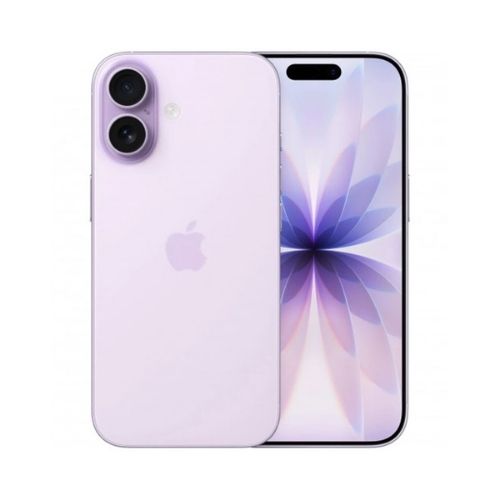
The iPhone 17 brought a bigger 6.3 inch Super Retina XDR display, a tougher Ceramic Shield 2 front, and a 48MP Dual Fusion camera system to Apple’s standard lineup. Whether you picked up the iPhone 17, the slim iPhone 17 Air, or the camera focused iPhone 17 Pro and iPhone 17 Pro Max, the right accessories protect that investment and make the phone genuinely easier to use every day.
This guide walks through the accessories worth buying in Sri Lanka right now, organised by what they actually solve: drop protection, screen and camera protection, faster charging, and everyday convenience.
Key Takeaways
- A MagSafe or Qi2 compatible case is the single most useful iPhone 17 accessory, since it protects the phone and unlocks magnetic chargers, wallets, and stands.
- Tempered glass and a camera lens protector are cheap insurance against the two most common repair bills: cracked screens and scratched lenses.
- iPhone 12 through iPhone 17 all share the same MagSafe magnet layout, so most existing MagSafe chargers and power banks still work. Cases do not carry over, since they are sized to each model.
- A 20 to 30W USB-C wall charger gets the iPhone 17 to roughly 50 percent charge in about 20 minutes when paired with a supported cable.
- Buy accessories designed specifically for the iPhone 17 body, not repackaged iPhone 16 stock, since even small dimension differences affect port and camera cutout alignment.
1. A Protective Case With MagSafe Support
A case is the first accessory most iPhone 17 owners buy, and it is worth choosing carefully rather than grabbing the cheapest option. Look for raised edges around the camera module and screen, reinforced corners, and a built in magnet ring that keeps MagSafe alignment accurate. That magnet ring matters because it is what lets a case work with snap on wallets, car mounts, and chargers without you needing to remove the case first.
Slim, soft touch cases suit everyday use, while cases with reinforced corners and shock absorbing bumpers make sense if you are hard on your phone or work outdoors. Xmobile stocks a growing range of phone cases built for the current iPhone lineup, along with all in one protection packs that bundle a case with a screen protector and camera guard, similar to the Green Lion 4 in 1 Protection Pack sold for earlier iPhone generations.
2. Tempered Glass Screen Protection
The iPhone 17’s Ceramic Shield 2 front is rated for meaningfully better scratch resistance than earlier generations, but it is not scratch proof, and a cracked screen is still one of the most expensive repairs on the phone. A 9H hardness tempered glass screen protector adds a sacrificial layer that absorbs everyday scratches from keys, coins, and sandy beach bags, and it is far cheaper to replace than the screen underneath it.
Look for bubble free installation kits and anti fingerprint coating so the glass does not dull the display’s clarity. Xmobile carries tempered glass options across current Apple models.
3. A Camera Lens Protector
The iPhone 17’s 48MP Dual Fusion camera system is one of the most expensive parts of the phone to repair if the lens glass cracks. A thin ring style lens protector clips or adheres around the camera housing and takes the impact instead, without noticeably affecting photo or video quality when fitted correctly. This is a small, inexpensive accessory that is easy to overlook until the first time the phone lands camera first on a tile floor. Xmobile stocks camera lens protectors sized for current phone models.
4. A MagSafe or Qi2 Wireless Charger
MagSafe’s magnet layout has stayed the same from the iPhone 12 through the iPhone 17, so a MagSafe charger, dock, or stand you already own should still snap into place and charge normally. Qi2 chargers, the open industry standard built on the same magnetic alignment idea, work the same way. A magnetic charging stand on a desk or nightstand is genuinely one of the most used accessories owners report, since it turns charging into a one handed motion instead of hunting for a cable in the dark.
5. A Reliable Power Bank
For travel, long work days, or areas with less predictable power, a magnetic power bank that snaps onto the back of the phone is worth carrying. Pick one with pass through charging so it can power the phone and refill itself from a wall outlet at the same time, and check the wattage output rather than only the battery capacity, since a higher mAh figure does not always mean a faster charge. Xmobile stocks power banks from brands including Baseus and Green Lion, alongside the wider Powerology accessory range.
6. A Fast USB-C Charger and Cable
The iPhone 17 charges via USB-C, and pairing it with a 20 to 30W USB-C wall charger and a supported USB-C cable gets the phone to roughly 50 percent in about 20 minutes. A second cable kept at a desk or in a bag removes the daily friction of moving one cable between rooms, and a longer 2 metre cable is worth it for anyone who uses the phone in bed or on a couch while it charges.
7. AirPods for a Complete Setup
While not strictly a protective accessory, AirPods round out the iPhone 17 experience with instant pairing, Find My integration, and MagSafe charging cases that share a charger with the phone itself. The Apple AirPods Pro 3 add improved noise cancellation and live translation, while the AirPods Pro 2 remain a strong value option for anyone upgrading from wired or older Bluetooth earbuds.
Did You Know?
The magnetic ring alignment behind Qi2 wireless charging is not a competing invention. Apple contributed its MagSafe Magnetic Power Profile to the Wireless Power Consortium, the industry body behind the Qi standard, which is why MagSafe accessories and Qi2 accessories both snap into the same precise position on an iPhone 17.
Frequently Asked Questions
Do iPhone 16 accessories work with the iPhone 17? Chargers, MagSafe power banks, and mounts generally carry over since the magnet layout has not changed. Cases do not carry over, since the iPhone 17’s body dimensions differ from the iPhone 16, even where the difference is small.
What accessories should I buy first for a new iPhone 17? A case with MagSafe support and a tempered glass screen protector cover the two most common sources of damage and are worth buying on day one, even before deciding on chargers or power banks.
Is a MagSafe case necessary, or is any case fine? Any case will protect the phone from drops, but a MagSafe compatible case also lets you use magnetic chargers, wallets, and car mounts without removing the case, which is a convenience most owners end up wanting.
How fast does the iPhone 17 charge with a USB-C charger? With a 20 to 30W USB-C adapter and a supported cable, the iPhone 17 can reach roughly 50 percent charge in about 20 minutes.
Do I need both a screen protector and a case? Yes, if you want full coverage. A case protects the edges, back, and camera module from drops, while a screen protector guards specifically against scratches on the display glass, which a case’s raised edge does not fully prevent.
Are cheaper third party MagSafe accessories safe to use? Look for accessories that state Qi2 or MFi certification rather than unbranded magnetic chargers, since certified accessories are tested for consistent alignment and safe charging speeds.
Do I need a camera lens protector if my case already has raised edges? Raised edges on a case help when the phone is set down flat, but a dedicated lens protector adds a hard layer directly over the glass, which is useful protection against scratches from keys or grit in a pocket or bag.
Final Thoughts
You do not need every accessory on this list to protect an iPhone 17 well. A MagSafe compatible case, a tempered glass screen protector, and a fast USB-C charger cover the essentials for most owners, with a camera lens protector, power bank, and AirPods rounding things out for anyone who travels often or wants a fully connected Apple setup. Browse the full Apple accessories range at Xmobile to find accessories built for your exact iPhone 17 model.