


Which Samsung Galaxy Tab Should You Buy? A Complete 2026 Buying Guide

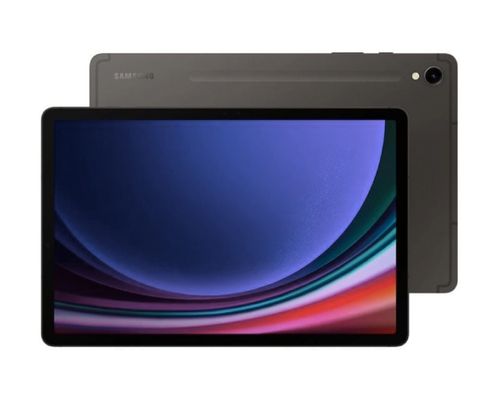
Samsung currently sells more tablet models than almost any other brand, and that variety is exactly why so many shoppers get stuck. Do you need the S Pen? Is 5G worth paying extra for? Should you go for the Ultra or is the FE line good enough?
This guide breaks down every current Samsung Galaxy Tab family available in Sri Lanka, who each one is actually built for, and how to pick the right one based on your budget and how you plan to use it.
Quick Answer: Samsung Galaxy Tab Recommendations by Use Case
If you only want the short version, here it is:
- Best for students on a budget: Samsung Galaxy Tab A9 or Tab A9 8GB RAM 128GB
- Best entry tablet with an S Pen included: Samsung Galaxy Tab S6 Lite 2024
- Best value mid-range tablet: Samsung Galaxy Tab S9 FE or Tab S9 FE Plus
- Best all-round flagship: Samsung Galaxy Tab S9 or Tab S9 Plus
- Best for creative professionals who need maximum screen and power: Samsung Galaxy Tab S9 Ultra
- Best newest model with the latest chipset: Samsung Galaxy Tab S10 FE or Tab S10 Ultra
Now let’s go through each one in detail so you understand exactly why.
1. Samsung Galaxy Tab A9 and A9+: Best for Basic Everyday Use
The Galaxy Tab A9 is Samsung’s entry point into tablets, and it is aimed squarely at people who want a simple, affordable device for streaming, browsing, and light schoolwork. It comes with an 8.7 inch display, an octa-core processor, and either 4GB or 8GB of RAM depending on the variant you choose.
This is not a tablet for heavy multitasking or gaming, but it handles video calls, e-books, YouTube, and casual browsing without any issues. If your child needs a device for online classes, or you want a lightweight second screen for the living room, this is the most budget-friendly entry into the Galaxy Tab family.
The larger Tab A9+ variant adds a bigger 11 inch display and quad speakers with Dolby Atmos, which makes it noticeably better for shared media viewing at home.
2. Samsung Galaxy Tab S6 Lite 2024: Best Budget Tablet With an S Pen
If note-taking is your main reason for buying a tablet, the Galaxy Tab S6 Lite 2024 is worth a serious look. It is one of the cheapest Samsung tablets that comes bundled with the S Pen, making it a strong pick for university students who want to write and sketch directly on the screen.
It runs on the Exynos 1280 chipset and ships with Android 14 and One UI 6.1, so it feels current despite the lower price point. Storage options go up to 128GB, expandable further with a microSD card. If your priority is affordable stylus support rather than raw performance, this is the better choice over the Tab A9 line.
3. Samsung Galaxy Tab S9 FE and S9 FE Plus: The Sweet Spot for Most People
The Galaxy Tab S9 FE sits right in the middle of Samsung’s lineup, and for most buyers, this is genuinely the smartest option. It runs on the Exynos 1380 chip, supports the S Pen, and carries an IP68 rating for water and dust resistance, a feature that is rare even among premium tablets.
The larger Tab S9 FE Plus steps things up with a 12.4 inch display, up to 12GB of RAM, and a 10,090mAh battery rated for around 14 hours of video playback. There is also a 5G variant if you want cellular connectivity on the go.
Choose this family if you want flagship-level durability and a large, sharp display without paying full flagship pricing.
4. Samsung Galaxy Tab S9, S9 Plus, and S9 Ultra: The Flagship Tier
The standard Galaxy Tab S9 runs on the Snapdragon 8 Gen 2, paired with a Dynamic AMOLED 2X display and a 120Hz refresh rate. It is built for people who genuinely use their tablet for productivity, whether that is video editing on the go, digital art, or heavy multitasking between several apps at once.
Step up to the Tab S9 Plus for a bigger screen and dual rear cameras, or go all the way to the Tab S9 Ultra, which features a massive 14.6 inch display and an 11,200mAh battery. The Ultra is genuinely closer to a laptop replacement than a typical tablet, especially when paired with a keyboard case for tasks like editing documents or presentations.
All three models in this family share the IP68 rating and S Pen support, so the real decision comes down to how large a screen you want and how much you are willing to spend.
5. Samsung Galaxy Tab S10 FE and S10 Ultra: The Newest Generation
For buyers who want the latest hardware, the Galaxy Tab S10 FE brings the Exynos 1580 chipset, an adaptive 90Hz display with up to 800 nits of brightness, and an upgraded 13MP rear camera. It also keeps the IP68 rating and adds Circle to Search with Google, letting you search anything on screen just by circling it.
At the top of the range sits the Galaxy Tab S10 Ultra, which pairs a large Dynamic AMOLED 2X display with the S Pen and Galaxy AI features baked in, along with up to 16 hours of battery life. If you want the newest chipset, the newest camera hardware, and the longest support window going forward, this generation is where to look.
6. Samsung Galaxy Tab S8: Still a Solid Choice if You Find One on Offer
The Galaxy Tab S8 is an older flagship, launched with an 11 inch display, a Snapdragon 8 Gen 1 processor, and an 8,000mAh battery. It has since been succeeded by the S9 and S10 lines, but if you come across it at a discounted price and don’t need the very latest chipset, it remains a capable tablet for everyday productivity and media consumption.
What Does the IP68 Rating Actually Mean?
You will notice IP68 mentioned repeatedly across the Tab S9 FE, S9, S9 Plus, S9 Ultra, S10 FE, and S10 Ultra. This is not just marketing language. IP68 is defined by the international IEC 60529 standard, where the “6” means complete protection against dust and the “8” means the device is protected against continuous immersion in water beyond one meter, with the exact depth and duration set by the manufacturer. In practical terms, this means these Galaxy Tab models can survive rain, spills, and accidental drops in water far better than tablets without any ingress protection rating at all. If durability is a priority for you, particularly if you plan to use the tablet outdoors, in the kitchen, or around young children, prioritizing a model with this rating is a genuinely meaningful upgrade rather than a marketing checkbox. You can read a more detailed technical breakdown of how IP ratings work from Zebra’s IP rating explainer.
Accessories Worth Considering
Once you have picked a model, a few accessories can significantly change how useful the tablet becomes day to day. A keyboard case turns any of the larger Galaxy Tab models, particularly the Tab S9 Plus, S9 Ultra, or S10 Ultra, into a genuine laptop alternative for emails, documents, and browsing. If you picked a tablet without a bundled S Pen, such as the Tab A9 or A9+, an aftermarket stylus can still work for basic navigation, though you will lose pressure sensitivity and the deeper software integration that Samsung’s official S Pen provides on supported models. A protective case is worth adding even on the IP68 rated tablets, since that rating protects against water and dust, not against cracked screens from drops onto hard surfaces.
How to Choose: A Simple Decision Framework
Ask yourself these three questions before deciding:
1. Do you need the S Pen? If yes, skip the Tab A9 line and look at the S6 Lite, S9 FE, S9, or S10 series, all of which support stylus input.
2. What screen size fits your use case? Around 8 to 11 inches works well for portability and reading. 12.4 inches and above suits people who want to replace a laptop for light work or watch a lot of video content.
3. What is your budget ceiling? Entry level buyers should stay within the Tab A9 or S6 Lite range. Mid-range buyers get the best value from the S9 FE family. If budget is not a major constraint, the S9 Ultra or S10 Ultra deliver the most complete experience.
Did You Know?
According to IDC’s Worldwide Quarterly Personal Computing Device Tracker, Samsung has consistently held the number two position in global tablet shipments behind Apple, with Samsung Electronics leading the market with a 37.2 percent share in India’s consumer tablet segment in 2025. This kind of sustained scale is part of why Samsung tablets receive long software support windows and a wide accessory ecosystem, both of which matter when you are deciding which model to commit to. You can read more from IDC’s tablet market coverage here.
Key Takeaways
- The Tab A9 and A9+ are the most affordable options, best suited for basic browsing, streaming, and casual use.
- The Tab S6 Lite 2024 is the cheapest way to get S Pen support in the Galaxy Tab lineup.
- The Tab S9 FE and S9 FE Plus offer the best overall value, combining an IP68 rating, S Pen support, and a large display at a mid-range price.
- The Tab S9, S9 Plus, and S9 Ultra are built for genuine productivity work, with the Ultra suited to users who want a near-laptop experience.
- The Tab S10 FE and S10 Ultra bring the newest chipsets, upgraded cameras, and Galaxy AI features for buyers who want the latest technology.
- Match your choice to how you will actually use the tablet: casual media use, note-taking, or serious productivity, rather than simply buying the most expensive model available.
- All current Samsung Galaxy Tab models are available at XMobile with local pricing and support in Sri Lanka.
Frequently Asked Questions
1. Which Samsung Galaxy Tab is best for students? For most students, the Samsung Galaxy Tab S9 FE offers the best mix of price and features, including S Pen support for note-taking and a large, durable display. Budget-conscious students can consider the Tab A9 or Tab S6 Lite 2024.
2. Do all Samsung Galaxy Tabs support the S Pen? No. The Tab A9 and A9+ do not support the S Pen. S Pen support starts with the Tab S6 Lite and continues through the S9 FE, S9, and S10 series.
3. Is the Samsung Galaxy Tab S9 Ultra worth the extra cost over the Tab S9? It depends on your use case. The S9 Ultra makes sense if you want a genuinely large 14.6 inch display for productivity or creative work. If you mainly use a tablet for browsing, streaming, and note-taking, the standard Tab S9 or the Tab S9 FE Plus will feel just as satisfying for considerably less money.
4. What is the difference between the Tab S9 FE and the Tab S9? The Tab S9 FE uses Samsung’s Exynos 1380 chipset, while the Tab S9 uses the more powerful Snapdragon 8 Gen 2. The Tab S9 also has a sharper Dynamic AMOLED 2X display with a 120Hz refresh rate, making it better suited for demanding apps and gaming.
5. Which Samsung Galaxy Tab has the best battery life? The Tab S9 Ultra and Tab S9 FE Plus both feature large batteries rated for extended use, and the Tab S10 Ultra offers up to 16 hours of video playback, among the longest in the current lineup.
6. Are Samsung Galaxy Tabs water resistant? Yes, most current models from the Tab S9 FE upward, including the S9, S9 Plus, S9 Ultra, S10 FE, and S10 Ultra, carry an IP68 rating for water and dust resistance. The Tab A9 series does not have this rating.
7. Can I use a Samsung Galaxy Tab as a laptop replacement? The Tab S9 Ultra and Tab S10 Ultra come closest to replacing a laptop for light productivity work, especially when paired with a keyboard case. For heavier workloads like professional video editing, a laptop is still the better tool.
8. Where can I buy a genuine Samsung Galaxy Tab in Sri Lanka? You can browse the full, current range of Samsung Galaxy Tab models with local pricing at XMobile’s Samsung Tabs collection.